
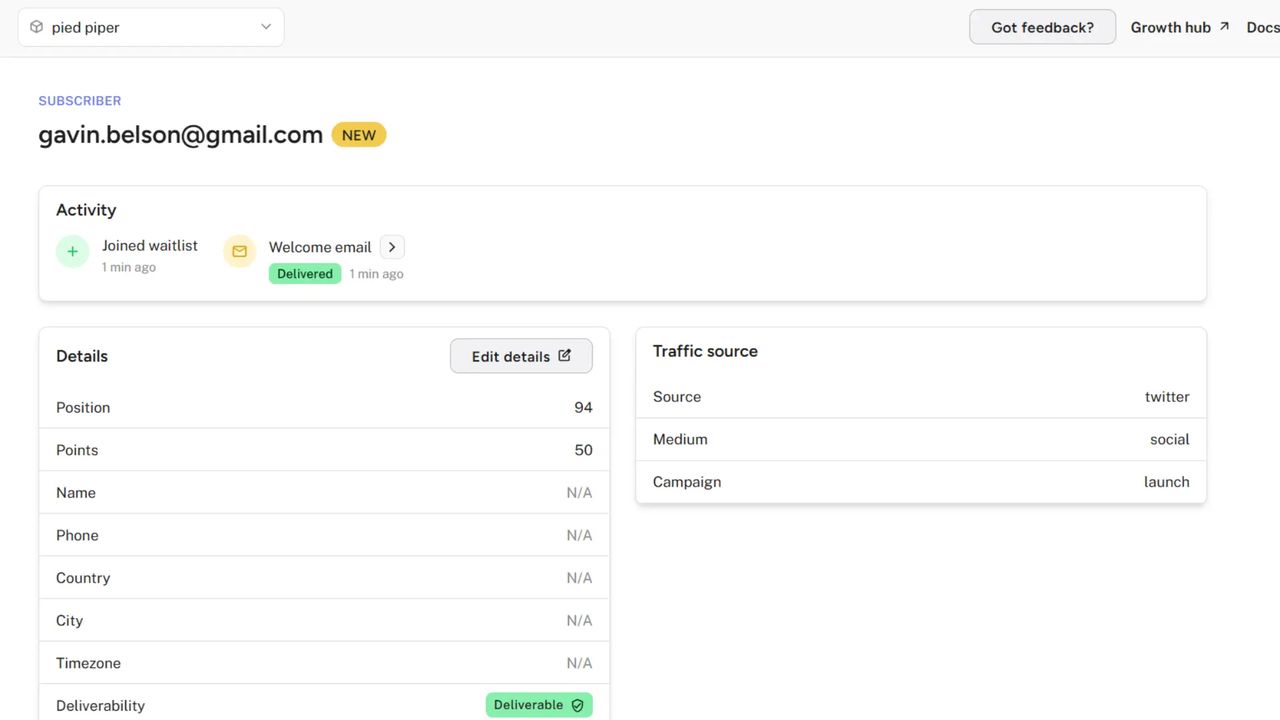
We've added UTM tracking for landing pages. Know exactly where your subscribers come from by adding UTM parameters to your landing page URLs.
How It Works
Add standard UTM parameters to any Waitlister landing page URL, and we'll automatically capture them when someone signs up.
Example URL:
code
https://waitlister.me/p/your-waitlist?utm_source=twitter&utm_medium=social&utm_campaign=launch
When this subscriber signs up, you'll see their traffic source in their profile.
Supported Parameters
| Parameter | Purpose | Example |
|---|---|---|
utm_source | Where traffic comes from | twitter, newsletter, whatsapp |
utm_medium | Marketing medium | social, email, cpc, referral |
utm_campaign | Specific campaign name | product-launch, black-friday |
utm_term | Paid search keywords | waitlist+software |
utm_content | A/B test variants | cta-blue, header-v2 |
Subscriber Details
UTM data appears in a dedicated Traffic Source card on each subscriber's profile, showing only the parameters that were captured.
Use Cases
- Social campaigns — Track which platform drives the most signups
- Influencer collabs — Give each partner a unique campaign tag
- Community shares — Distinguish WhatsApp groups, Discord servers, or Slack channels
- Ad performance — Compare paid channels with organic traffic
- Email campaigns — See which newsletter sends convert best
Getting Started
Just add UTM parameters to your landing page URL when sharing. No configuration needed — we capture them automatically.
Works with both Waitlister-hosted landing pages and custom domains.