
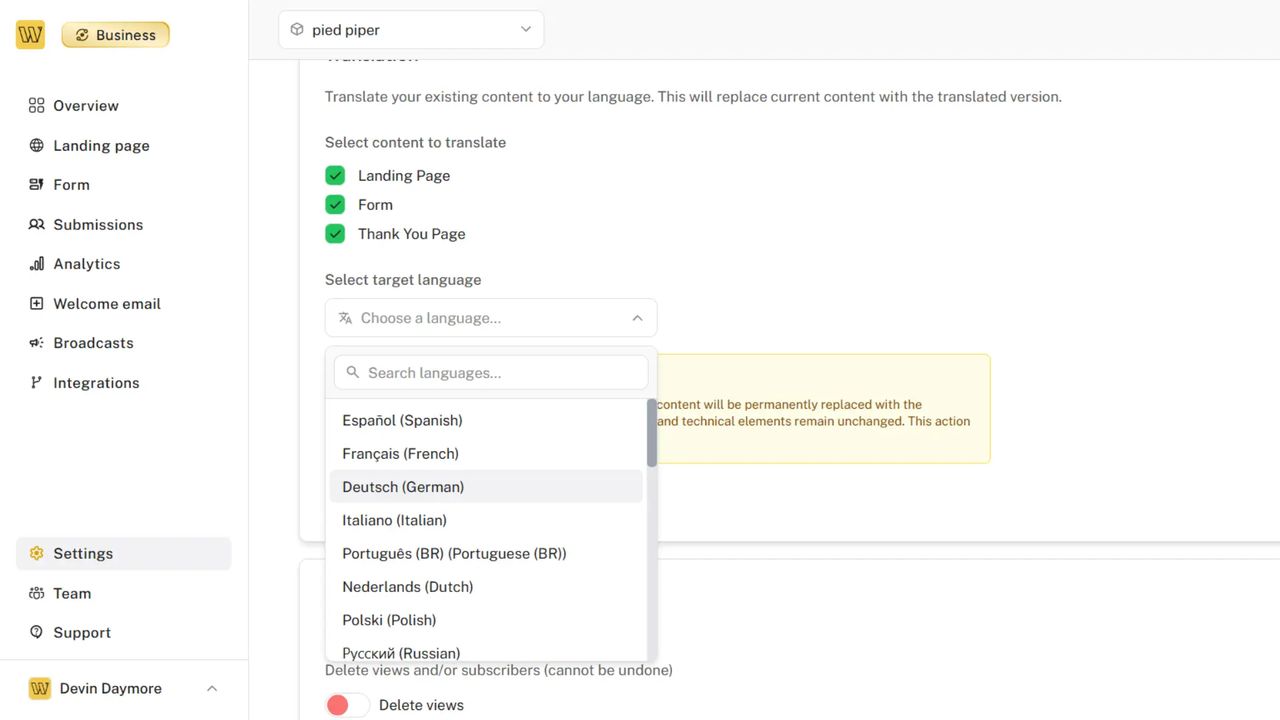
Your waitlist can now speak to the world. Translate your entire waitlist experience — landing pages, forms, and thank-you pages — to over 30 languages while preserving your brand voice and formatting.
What's Added
One-Click Translations
Transform your waitlist into a multilingual experience in seconds.
- 30+ Languages - Spanish, French, German, Japanese, Korean, Chinese, Arabic, and many more
- Natural Translation - Preserves your tone, formatting, and brand voice
- Complete Coverage - Translates landing pages, embedded forms, and thank-you pages
- Instant Updates - Changes apply immediately across all your content
Smart Content Handling
Translations understand context and structure to deliver natural results.
- Custom sections and headlines translate seamlessly
- Button text and calls-to-action maintain their impact
- Referral messages and social sharing text adapt naturally
- Form labels, placeholders, and validation messages localize properly
Preserves Your Design
Translations maintain your exact layout, styling, and branding.
- Font families and sizes remain unchanged
- Colors, spacing, and visual hierarchy stay intact
- Images, logos, and custom CSS unaffected
- Mobile responsiveness preserved perfectly
Supported Languages
Spanish, French, German, Italian, Portuguese (BR), Dutch, Polish, Russian, Japanese, Korean, Chinese (Simplified), Chinese (Traditional), Arabic, Hindi, Turkish, Swedish, Danish, Finnish, Norwegian, Czech, Greek, Hebrew, Thai, Vietnamese, Indonesian, Malay, Ukrainian, Romanian, Hungarian, Slovak
How It Works
- Select Content - Choose which parts to translate (landing page, form, or thank-you page)
- Pick Language - Select your target language from 30+ options
- One Click - Translate everything while preserving your design
- Instant Live - Changes apply immediately to your live waitlist
Translation typically completes in 15-30 seconds per content type. You can translate all three (landing page, form, thank-you page) simultaneously to save time.
Setup
- Navigate to your waitlist's Settings → Translations tab
- Select which content types you want to translate
- Choose your target language from the dropdown
- Click Translate and wait 15-30 seconds
- Your translated content goes live immediately
Translations can be updated or changed to a different language at any time by repeating the process.