
Send waitlist emails from your own domain
Send from hello@yourcompany.com instead of noreply@waitlist.waitlister.me. Automatic DKIM and SPF — add a few DNS records, Waitlister handles the rest. Better deliverability, more trust, replies go to your inbox.
10,000+ founders send waitlist emails on Waitlister















Why your waitlist emails
land in spam
Most waitlist tools send emails from a shared domain like noreply@toolname.com. Here's why that's a problem — and why sending from your own domain fixes it.
Shared domains inherit shared reputation
When you send from noreply@toolname.com, your emails share a sending reputation with every other user on that domain. If anyone else sends spam, your deliverability drops too — even if your content is perfect.
Subscribers don't recognize the sender
An email from noreply@waitlist.waitlister.me doesn't tell your subscriber who you are. They signed up for YourProduct — they expect to hear from YourProduct. Unrecognized senders get ignored, reported, or sent to spam.
Replies go to a dead end
When subscribers reply to noreply@toolname.com, the message goes nowhere. With your own domain, replies land in your inbox — so you can have real conversations with your earliest supporters.
Your own domain builds reputation early
Every email you send from yourcompany.com builds its sending reputation with Gmail, Outlook, and Yahoo. Starting during the pre-launch phase means your domain has a positive history before you even launch — which benefits every email you send after.
Set up in under 10 minutes
No SMTP server. No separate email service. No API keys to manage. Add DNS records, Waitlister verifies them through Resend, and you're sending from your domain.
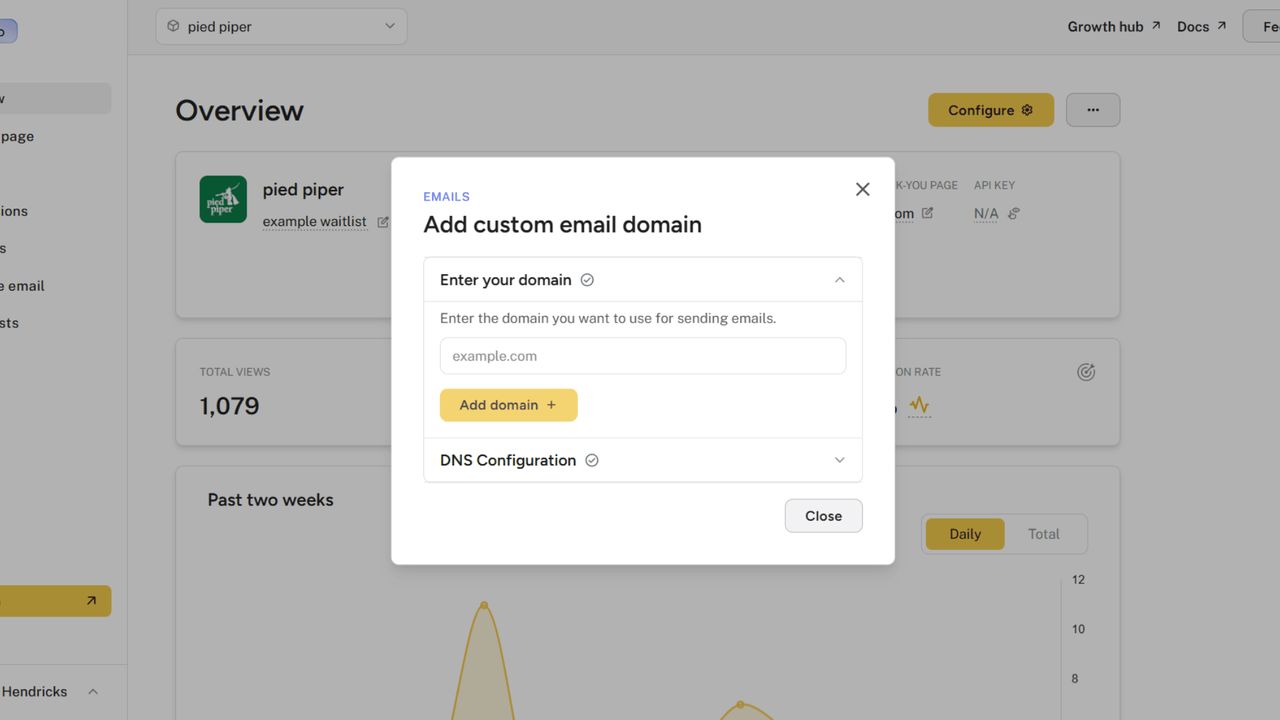
Add your domain
In Settings > Domains > Email domain, enter your domain (e.g., yourcompany.com). Waitlister generates the DNS records you need.
Add DNS records
Copy the TXT and MX records into your domain provider (Cloudflare, GoDaddy, Namecheap, etc.). These configure DKIM and SPF automatically.
Verify and send
Click Verify — or wait for Waitlister's auto-check (every 15 minutes). Once verified, your custom domain becomes the default sender for all waitlist emails.
Get started for free
Start building your waitlist with Waitlister and get the most out of your pre-launch campaign
I can only say good things about Waitlister. Their landing page is very user friendly, and Waitlister's pricing is more than reasonable.

Every email, one sender identity
Once verified, your custom domain is set as the default sender. You can switch between it and the default Waitlister domain anytime.
Welcome emails
The first email your subscriber receives comes from hello@yourcompany.com, not a generic address. First impressions matter — this one says "we're real, we're professional, and we built this ourselves."
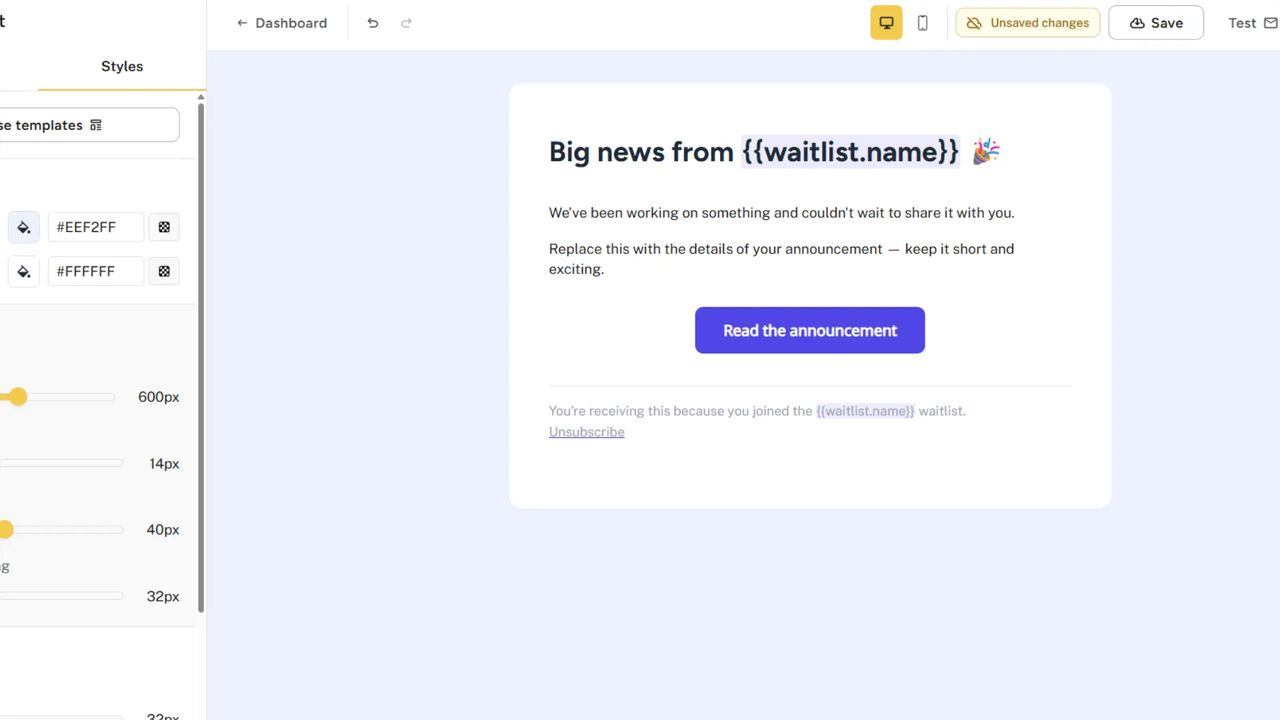
Broadcasts and launch announcements
Every update email, milestone announcement, and launch notification sends from your domain. When you email 5,000 subscribers saying "we're live," it comes from you — not from a tool they don't recognize.
Custom email domain across
waitlist tools
| Feature | Waitlister | GetWaitlist | Viral Loops | LaunchList | Prefinery |
|---|---|---|---|---|---|
| Send from your own domain | Launch plan | ||||
| Automatic DKIM/SPF setup | Manual SMTP | ||||
| No SMTP configuration needed | |||||
| Custom sender prefix (hello@, team@) | |||||
| Welcome emails | |||||
| Email broadcasts | |||||
| Double opt-in emails | |||||
| Auto-verification (every 15 min) |
Based on publicly available documentation as of April 2026 (LaunchList updated October 2026). Custom email domain is a common feature; the differences are in implementation — Waitlister uses Resend with automatic DKIM/SPF and no SMTP configuration, available on Growth plan ($49/mo).
Yes. On Waitlister's Growth plan ($49/mo), you connect your domain, add a few DNS records, and all waitlist emails — welcome emails, broadcasts, double opt-in confirmations, referral notifications — send from your domain. The sender prefix (hello@, team@, founders@) is configurable.
DKIM and SPF are set up automatically through Resend. No SMTP server to configure, no separate email service to manage.
The most common reasons: 1. Sending from a shared domain (noreply@toolname.com) — your reputation is tied to everyone else on that domain 2. Missing DKIM/SPF records — email providers can't verify the sender is legitimate 3. Brand-new sending domain — email providers distrust domains that suddenly start sending 4. Spammy content — ALL CAPS, excessive exclamation marks, aggressive sales language 5. Cold list — imported subscribers who haven't heard from you in months Setting up a custom email domain with proper DNS records is the single most impactful fix.
Yes. Once your domain is verified, you can send from any address on that domain — hello@, team@, founders@, whatever you choose. The domain is verified once; the sender prefix is configurable per waitlist in your email settings.
In Waitlister: Settings > Domains > Email domain > Add domain. Enter your domain, add the DNS records (TXT and MX) shown in the modal to your domain provider, and click Verify. Takes under 10 minutes. Once verified, your custom domain becomes the default sender. Waitlister handles DKIM and SPF automatically via Resend — no SMTP configuration needed.
No. Waitlister uses Resend under the hood for email delivery. You add DNS records to verify your domain — Resend handles the actual sending infrastructure. There's no SMTP server to configure, no API keys to manage, and no email service to sign up for.
Your waitlist emails send from the default Waitlister sending domain (e.g., yourname@waitlister.me). This works fine — Waitlister maintains good deliverability on the shared infrastructure. A custom domain gives you better control over your sender reputation and a more professional appearance, but it's not required.
Usually a few minutes to a few hours. DNS propagation can take up to 48 hours in rare cases, but most providers (Cloudflare, Namecheap, GoDaddy) propagate within 15 minutes. Waitlister auto-checks pending domains every 15 minutes and notifies you when verification completes.
No separate charge. Custom email domain is included on the Growth plan ($49/mo) with 1 domain, and on the Business plan ($129/mo) with 3 domains. The same plans include all other Growth/Business features — API, webhooks, translations, custom landing page domains, etc.
Get started for free
Start collecting sign ups for your product launch in minutes — no coding required.
Get started