
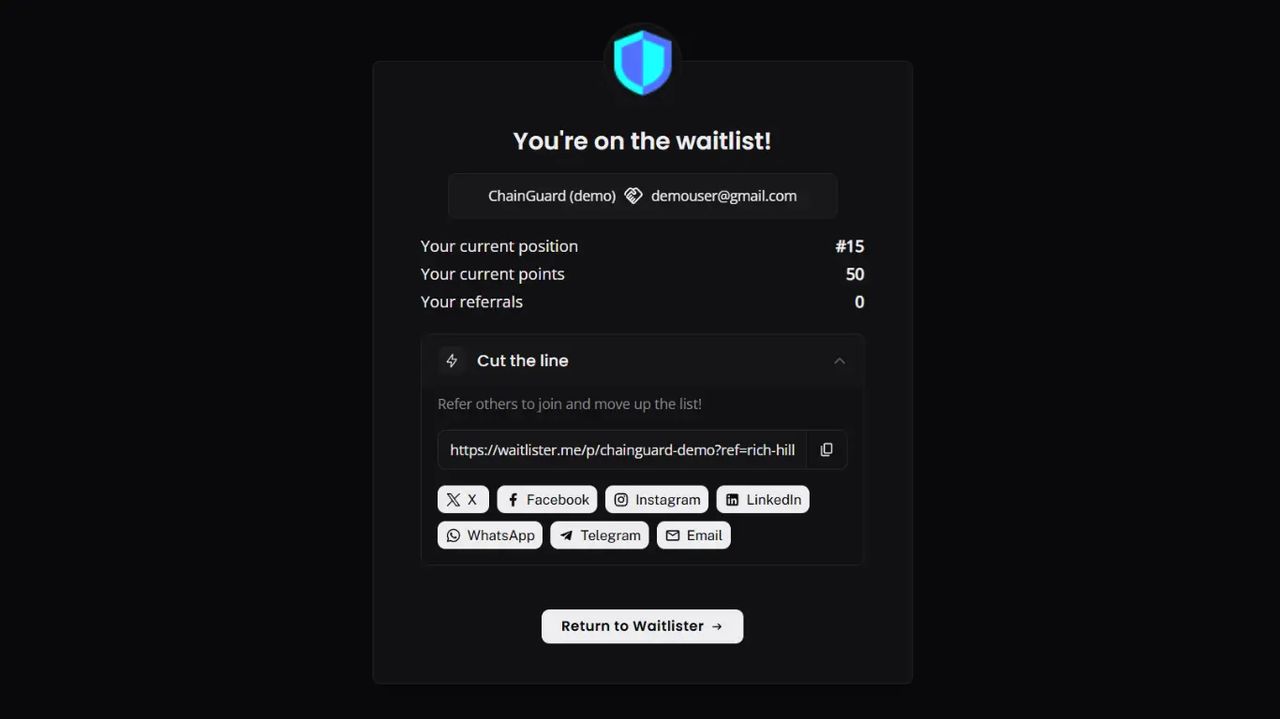
The thank-you page now supports CSS variables for full color customization. Override any color on the page by setting a single variable — no !important or complex selectors needed.
What's New
50+ CSS Variables
Every color on the thank-you page is now controlled by a --ty-* CSS variable with sensible defaults.
- Card & text - Background, borders, primary/secondary/muted text colors
- Section icons - Referral, social tasks, leaderboard, and social links icons
- Share buttons - Individual colors for X, Facebook, Instagram, Threads, LinkedIn, WhatsApp, Telegram, and Email
- Platform icons - Social task and social link icon colors per platform
- Points & badges - Badge backgrounds, point colors, completed task states
- Return button - Background and text color
- Leaderboard - Inherits the same variables for a consistent look
Simple to Use
Set variables on .waitlist-thank-you-page in the Custom CSS editor:
css
.waitlist-thank-you-page {
  --ty-card-bg: #1a1a1a;
  --ty-card-border: #333333;
  --ty-text-color: #e0e0e0;
  --ty-button-bg: #e0e0e0;
  --ty-button-text: #0f0f0f;
  --ty-highlight-bg: #2a2a2a;
  --ty-section-header-bg: #222222;
}
Built-In Reference
Click "Available CSS variables" in the Custom CSS editor to see the full list with default values — no need to check documentation.
Backward Compatible
Existing Custom CSS continues to work. The original Tailwind classes remain on all elements, so any CSS targeting .bg-violet-100, .button-main, .bg-gray-50, etc. still applies as before.
Use Cases
| Goal | Variables to Set |
|---|---|
| Dark mode | --ty-card-bg, --ty-text-color, --ty-section-header-bg, --ty-section-border |
| Match brand colors | --ty-highlight-bg, --ty-button-bg, --ty-referral-icon-bg |
| Monochrome share buttons | --ty-share-x-bg, --ty-share-facebook-bg, etc. all to same color |
| Neutral icons | --ty-referral-icon-bg, --ty-social-icon-bg, --ty-leaderboard-icon-bg all to same gray |
Documentation
See the full variable list and examples in the Thank-You Page documentation.