
Waitlist
Leaderboard Embed
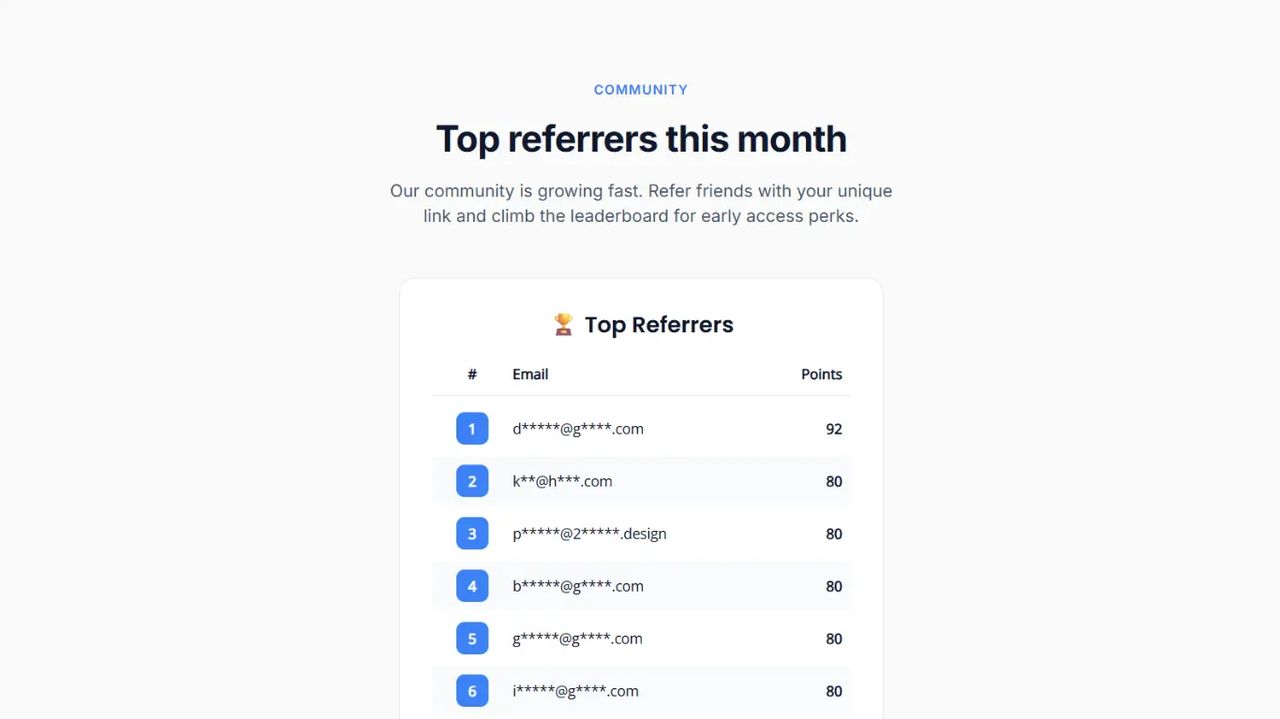
The leaderboard embed lets you display your top referrers on any website — separately from your sign-up form. It's ideal for landing pages, blog posts, community sites, or anywhere you want to showcase engagement and drive competition around your referral program.
Requirements
The leaderboard embed is available on paid plans, starting from the Launch plan. If the owner of a waitlist is on the Free plan, the embed will display an "upgrade required" message instead of the leaderboard.
Your waitlist must have at least one subscriber with referrals (or points, depending on your chosen metric) for the leaderboard to show any data. Otherwise, visitors will see an empty state.
Embedding Your Leaderboard
There are two simple steps to embed your leaderboard on any website.
1. Add Script to Head
First, add the Waitlister leaderboard embed script to your website's <head> section.
<script src="https://waitlister.me/js/embed-leaderboard.js" defer></script>
The script is the same for all leaderboards.
2. Add Leaderboard Container
Next, add a div container with your unique waitlist key where you want the leaderboard to appear.
<div
  class="waitlister-leaderboard"
  data-waitlist-key="YOUR-WAITLIST-KEY"
></div>
You can find your waitlist key by navigating to the "Overview" page in your waitlist dashboard.
3. Your Leaderboard is Ready
That's it. The leaderboard will automatically render, fetch the current top referrers, and resize to fit its content.
Customization
Unlike the form, there is no dashboard editor for the leaderboard embed. Instead, you customize it entirely through data-* attributes on the container div. This keeps the embed lightweight and lets you iterate on styling directly in your site's code.
Basic Example
<div
  class="waitlister-leaderboard"
  data-waitlist-key="YOUR-WAITLIST-KEY"
  data-positions="20"
  data-title="Top Referrers"
  data-accent-color="#ff5733"
></div>
Dark Theme Example
<div
  class="waitlister-leaderboard"
  data-waitlist-key="YOUR-WAITLIST-KEY"
  data-positions="10"
  data-title="Leaderboard"
  data-bg-color="#0f172a"
  data-text-color="#e5e7eb"
  data-title-color="#ffffff"
  data-border-color="#1e293b"
  data-border-radius="16"
  data-accent-color="#3b82f6"
  data-badge-shape="rounded"
></div>
Minimal Example
<div
  class="waitlister-leaderboard"
  data-waitlist-key="YOUR-WAITLIST-KEY"
  data-positions="5"
  data-show-title="false"
  data-padding="8"
  data-max-width="360"
  data-border-width="0"
></div>
Customization Reference
All attributes are optional. If omitted, the default value is used.
Data
| Attribute | Type | Default | Description |
|---|---|---|---|
data-positions | number (1-50) | 10 | Number of entries to display |
data-metric | referrals or points | referrals | Which value to show next to each entry |
Layout
| Attribute | Type | Default | Description |
|---|---|---|---|
data-alignment | left, center, or right | center | Horizontal alignment of the leaderboard and title |
data-padding | number (0-64) | 16 | Inner padding in pixels |
data-max-width | number (240-1200) | 480 | Maximum width of the leaderboard in pixels |
Title
| Attribute | Type | Default | Description |
|---|---|---|---|
data-show-title | true or false | true | Whether to display the title |
data-title | string | Leaderboard (translated) | Title text. Defaults to the translated equivalent based on the active language |
data-title-color | color (hex) | #111111 | Title text color |
data-title-size | number (10-48) | 20 | Title font size in pixels |
data-title-weight | number (100-900) | 600 | Title font weight |
data-title-font-family | string | font-poppins | Title font family |
Body
| Attribute | Type | Default | Description |
|---|---|---|---|
data-text-color | color (hex) | #333333 | Body text color |
data-body-font-family | string | font-open-sans | Body font family |
data-body-size | number (10-24) | 14 | Body font size in pixels |
Container
| Attribute | Type | Default | Description |
|---|---|---|---|
data-bg-color | color (hex) | #ffffff | Background color |
data-border-color | color (hex) | #e5e7eb | Border color |
data-border-width | number (0-8) | 1 | Border width in pixels |
data-border-radius | number (0-32) | 8 | Border radius in pixels |
Rows
| Attribute | Type | Default | Description |
|---|---|---|---|
data-row-alt-bg | true or false | false | Enable alternating row background colors |
data-row-bg-color | color (hex) | transparent | Background color for standard rows |
data-row-alt-color | color (hex) | transparent | Background color for alternating rows (when enabled) |
Position Badge
| Attribute | Type | Default | Description |
|---|---|---|---|
data-accent-color | color (hex) | #3b82f6 | Background color of the position badge |
data-badge-shape | circle, square, or rounded | circle | Shape of the position badge |
Labels
Override individual column headers or the empty-state text. Useful for custom wording, or for languages not included in the built-in translations. For supported languages, set data-language instead — all labels translate automatically.
| Attribute | Type | Default | Description |
|---|---|---|---|
data-position-label | string | # | Header text for the position column |
data-email-label | string | Email | Header text for the email column |
data-referrals-label | string | Referrals | Header text for the referrals/points column |
data-empty-text | string | No subscribers yet | Text shown when there are no entries |
Behavior
| Attribute | Type | Default | Description |
|---|---|---|---|
data-refresh-interval | number (0 or 60-3600) | 300 | Auto-refresh interval in seconds. Set to 0 to disable. Minimum 60 seconds |
data-language | string | auto-detected | Language code for default labels. Auto-detected from the host page's <html lang> attribute; falls back to en if the detected language isn't supported. Set explicitly to override |
Language
The leaderboard supports 30+ languages out of the box. All built-in text — column headers, empty state, and the default title — translates automatically.
Auto-Detection
By default, the leaderboard detects the language from your site's <html lang> attribute. If your site is already configured for a supported language, no extra setup is needed.
<html lang="es">
  <!-- Leaderboard renders in Spanish automatically -->
</html>
Manual Override
To set the language explicitly — for example, if your site's <html lang> doesn't match the audience for a specific page — use data-language:
<div
  class="waitlister-leaderboard"
  data-waitlist-key="YOUR-WAITLIST-KEY"
  data-language="fr"
></div>
Supported language codes: en, es, fr, de, it, pt, nl, pl, ru, ja, ko, zh, zh-TW, ar, hi, tr, sv, da, fi, no, cs, el, he, th, vi, id, ms, uk, ro, hu, sk.
If you need a language that isn't on this list, use the label overrides to set custom text.
Multiple Leaderboards on One Page
You can embed multiple leaderboards on the same page, including from different waitlists. Each div is independent and can have its own customization.
<div
  class="waitlister-leaderboard"
  data-waitlist-key="WAITLIST-KEY-A"
  data-title="Top Referrers"
></div>

<div
  class="waitlister-leaderboard"
  data-waitlist-key="WAITLIST-KEY-B"
  data-title="Most Points"
  data-metric="points"
></div>
Privacy
Subscriber emails are automatically scrambled before being displayed. For example, jane.smith@example.com appears as j*****@e*****.com. No personal information is exposed to visitors.
Auto-Resize
The leaderboard automatically calculates its height based on the number of entries and your customization. If you change data-positions or any styling later, the iframe resizes itself to fit the new content. You do not need to specify a fixed height.
Troubleshooting
The leaderboard shows an empty state: Your waitlist has no subscribers with referrals yet. Once someone signs up through a referral link, they'll appear on the leaderboard.
I see "Leaderboard embed unavailable": The waitlist owner is on the Free plan. Upgrading to Launch or higher will enable the embed.
The leaderboard isn't appearing: Check that the embed script is in your <head> section and that your container div has both the waitlister-leaderboard class and a valid data-waitlist-key attribute.
Colors look off on a dark background: Make sure to customize data-text-color and data-title-color alongside data-bg-color to keep text readable. If you use data-row-alt-bg="true", also set data-row-alt-color to a color that contrasts with your text.
Help and Support
Need assistance with your leaderboard embed? We're here to help.
- Contact us via the public contact form
- Access the "Help" page in your account dashboard